 Free. Submitted to WordPress.org, review pending.
WPCoreTools Email Verify
New customers confirm their email address before they can order. The customer receives one email with a confirmation link; clicking it confirms the address, and there are no codes, popups or outside services involved.
One email, one click
Email Verify asks new customers to prove the address is theirs. There are no codes to type, no popups and no outside service: the email comes from your own site.
-
A customer signs up
On your registration form or WooCommerce’s My Account page, as they do today.
-
They get one email with a link
The link is valid for 7 days by default. If it gets lost, the notice on your site has a resend link.
-
They click it, and they are confirmed
Whatever was waiting opens up. A mail program that opens links in advance cannot confirm the account for them.
You decide what waits
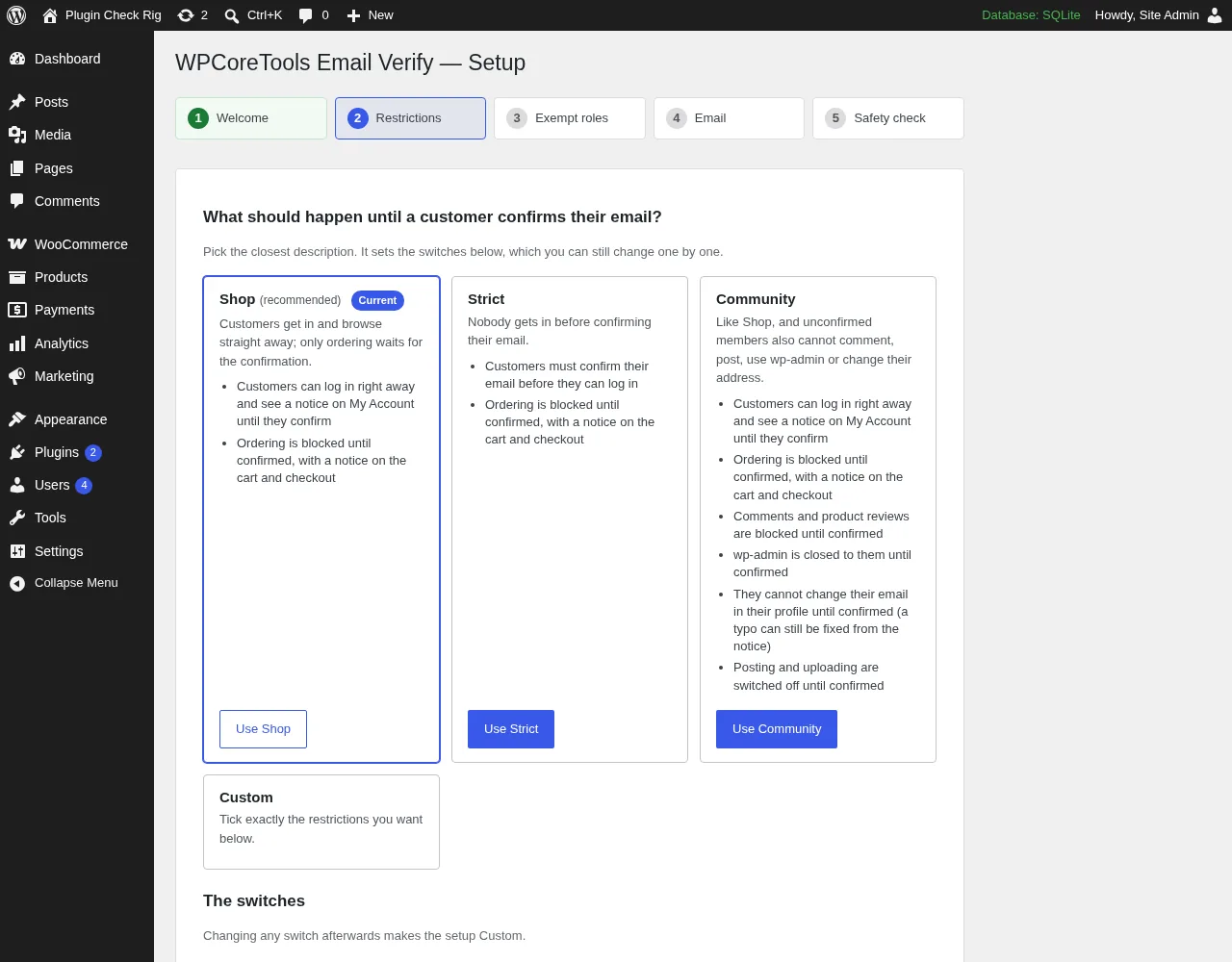
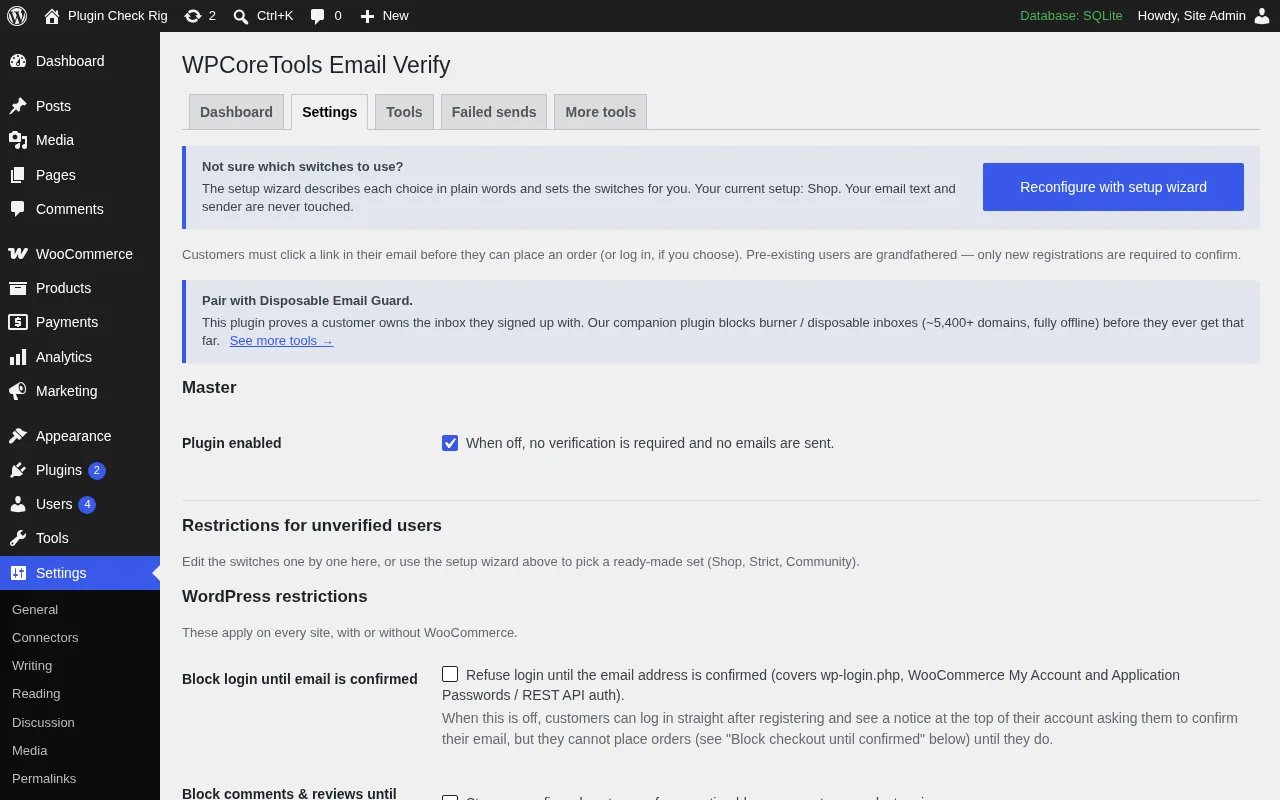
The setup wizard opens after activation and offers ready-made setups, each explained in plain words. Pick one, change single switches later under Settings > Email Verify, or run the wizard again at any time. With WooCommerce active the wizard suggests Shop; on a WordPress-only site the wizard suggests Community.
-
Shop
Recommended with WooCommerceCustomers get in and browse straight away; only ordering waits for the confirmation.
Waits until confirmed
- Placing orders
-
Strict
Nobody gets in before confirming their email.
Waits until confirmed
- Logging in
- Placing orders
-
Community
Like Shop, and unconfirmed members also cannot comment, post, use wp-admin or change their address.
Waits until confirmed
- Placing orders
- Comments and reviews
- wp-admin
- Changing the email in the profile
- Posting and uploading
-
Custom
Tick exactly the restrictions you want. Changing any switch after picking a setup makes it Custom.
Waits until confirmed
Your choice
A customer who creates an account at checkout can place that first order before the email arrives. To make the first order wait as well, turn on “Block signup at checkout”. It is a separate switch and part of no setup.
What is in it
Everything below is in the free plugin. There is no Pro version, no paid add-on, no license key and no tracking.
-
Confirmation link by email
Links are valid for 7 days by default, and you can set anything from 1 to 90. Tokens are stored hashed.
-
Choose what waits
Placing orders, logging in, comments and reviews, creating an account at checkout, wp-admin, changing the email address in the profile, and selected capabilities.
-
Setup wizard
Ready-made setups: Shop (recommended with WooCommerce), Strict, Community (recommended without it) or Custom. You can run it again at any time.
-
Clear notices for customers
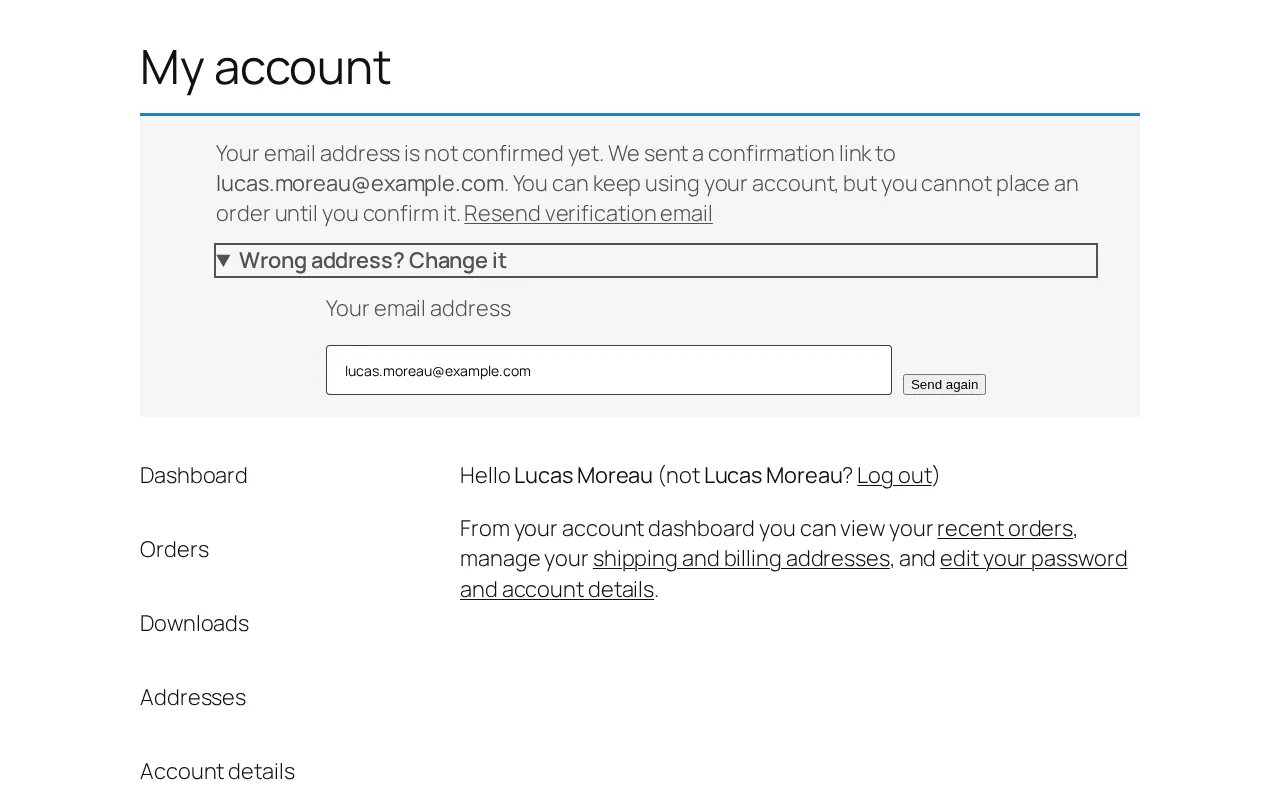
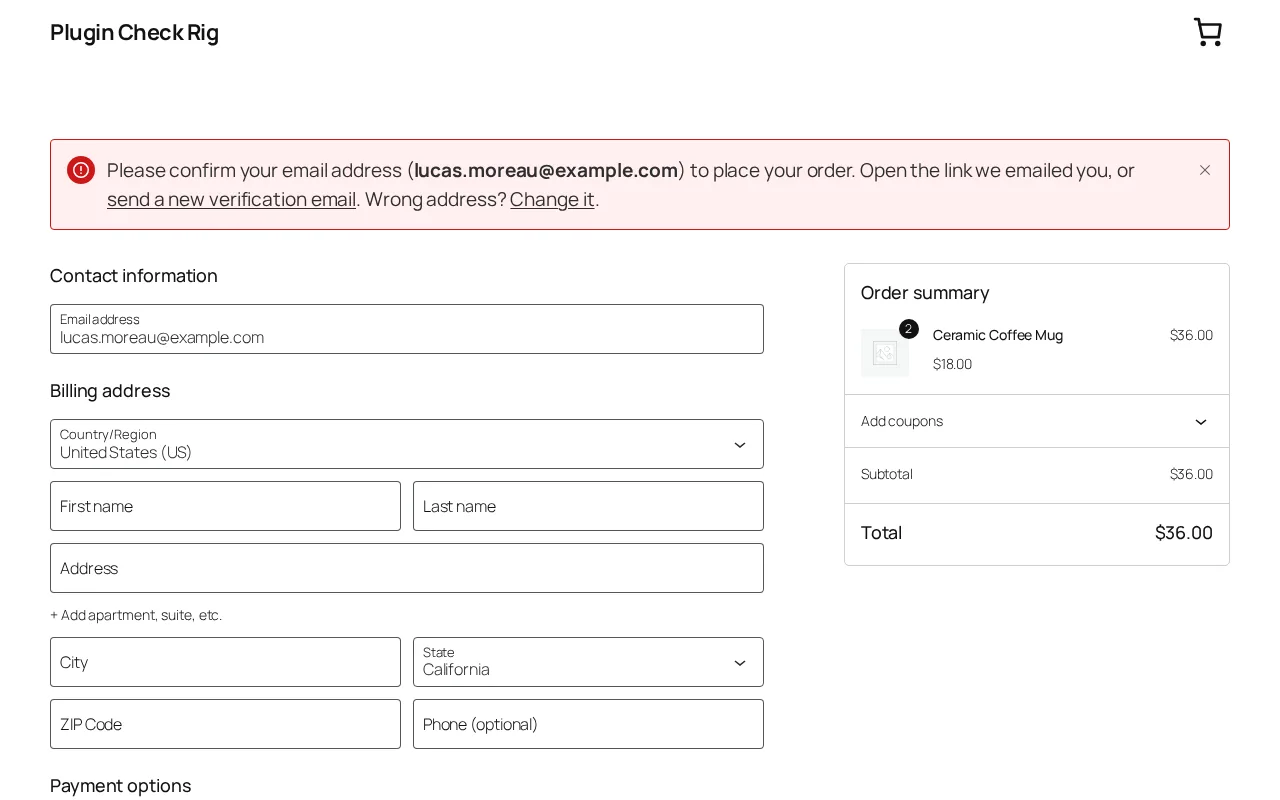
On My Account, the cart and checkout, with a resend link that counts down until a new email can be sent.
-
Wrong address? Change it
A customer who mistyped their address can correct it from the notice and get a new link.
-
Resend form for logged-out visitors
On the login page. It is rate-limited and never reveals whether an address is registered.
-
Safe against link scanners
Mail programs that open links in advance cannot confirm an account. Anyone not logged in as that customer sees a “Confirm my email” button first.
-
Email changes are confirmed too
A new address has to be confirmed: the customer gets a link at the new address. Staff in the exempt roles keep their status.
-
Warns about a second verification plugin
Two of them would leave customers confirmed in one and still blocked by the other, so Email Verify tells you when it finds one.
-
Plain-text email by default
Or WooCommerce’s email template, editable under WooCommerce > Settings > Emails.
-
Works without WooCommerce, and on Multisite
Without WooCommerce, new sign-ups confirm the same way, and logging in, comments and wp-admin can wait. Network activation works too.
-
WP-CLI and hooks
Check, confirm, unconfirm or resend from the command line, and filters and actions for your own code.
In your WooCommerce store
WooCommerce is optional. If you use it, Email Verify needs WooCommerce 9.2 or later.
- Classic checkout and the Cart and Checkout blocks. An unconfirmed customer sees why they cannot order yet, with a resend link.
- Pay for order links are covered as well.
- HPOS, WooCommerce’s order storage tables, and the older storage both work.
- WooCommerce 11.1 and later: one prompt. WooCommerce’s own email confirmation and this plugin stay in step, so customers see one prompt. On WooCommerce 11.0 the plugin’s conflict check tells you the prompt may still show. Confirming in either place counts in both. Existing customers can be synced once from the Tools tab, in the background, without sending any email.
- A Verified column on the Orders list.
- Your store’s email look. The confirmation email can use WooCommerce’s template, editable under WooCommerce > Settings > Emails.
For you in wp-admin
See who has confirmed, step in by hand, and find out quickly when emails do not go out.
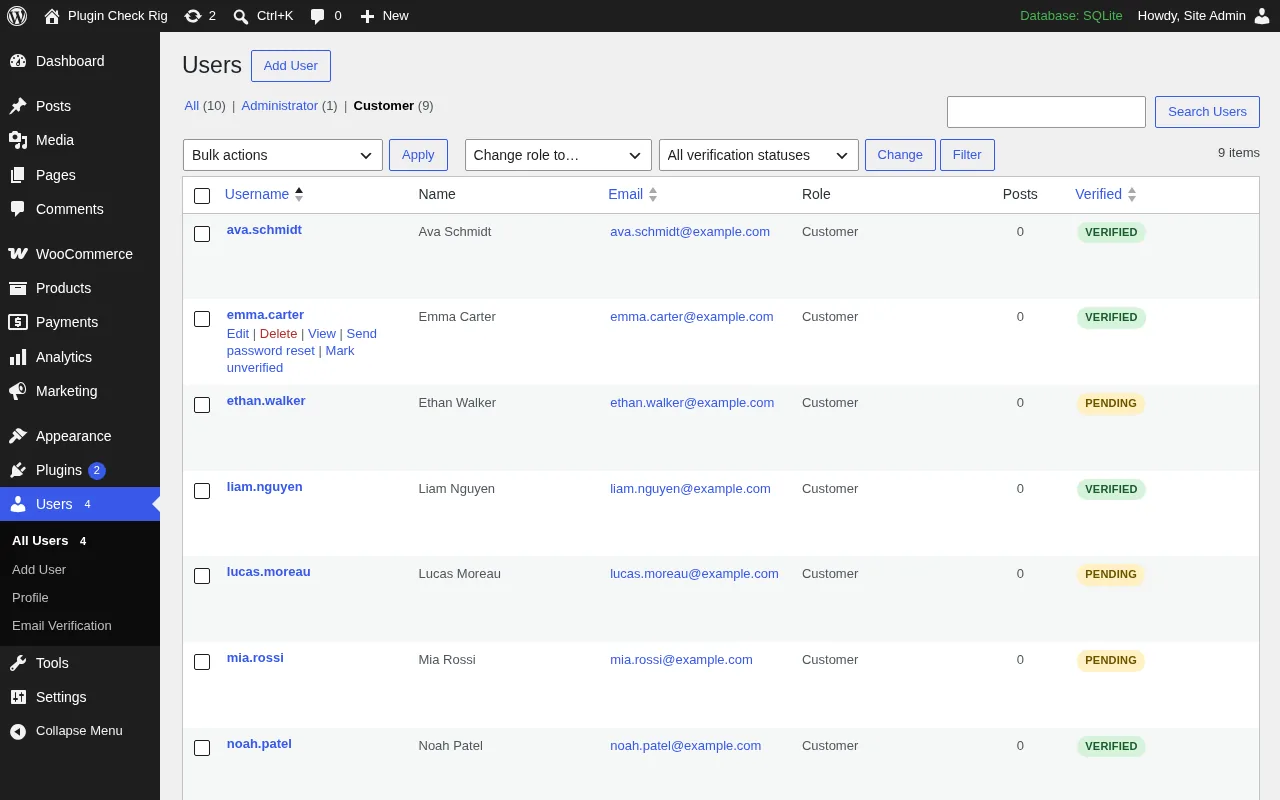
- A Verified column, a status filter and bulk actions on the Users list.
- Confirm or unconfirm by hand from the Users list, the user’s profile or WP-CLI, and resend the email from the same places.
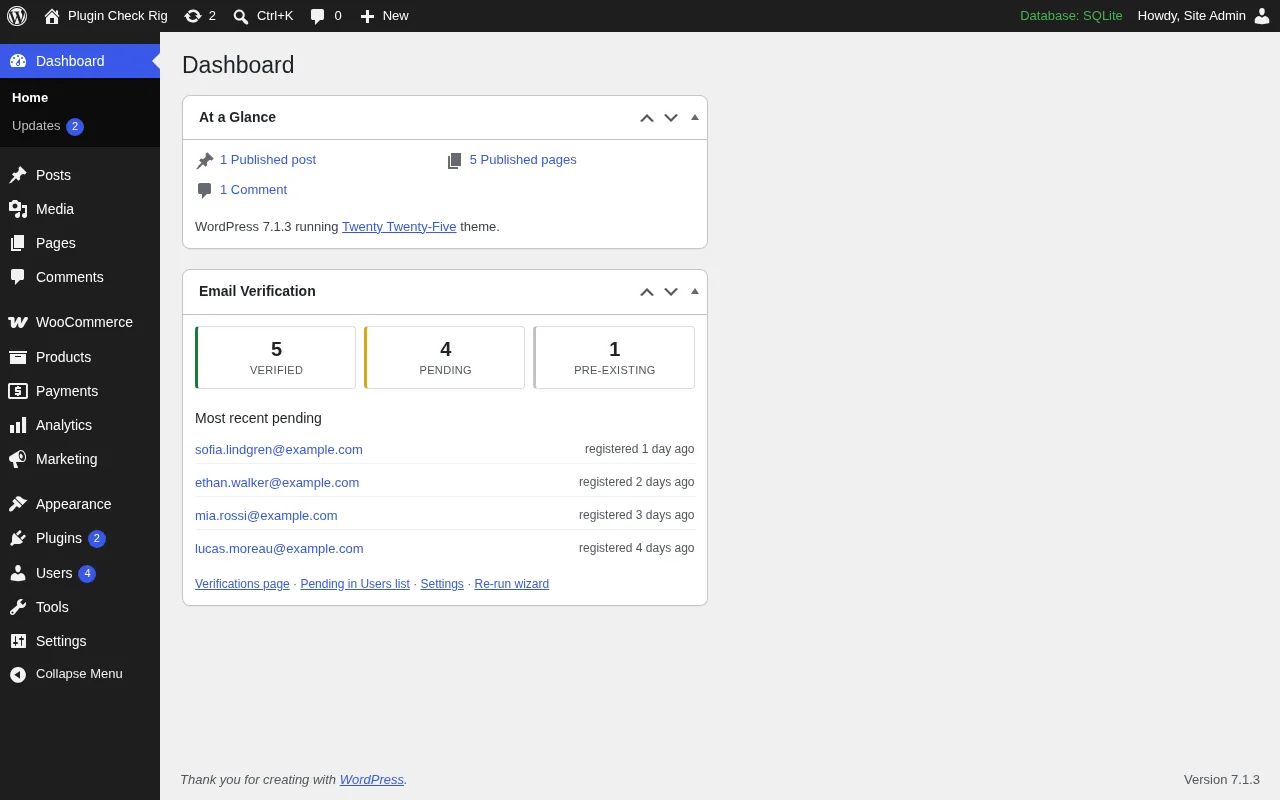
- A dashboard widget with verified and pending counts.
- Site Health checks.
- CSV exports.
- A log of emails that could not be sent, in the “Failed sends” tab.
Privacy
What the plugin does, and does not do, with your visitors’ data.
- No outside service The plugin contacts no outside service. Everything runs on your own site.
- No usage data It collects no usage data. No tracking, no account, no license key.
- Export and erase It supports WordPress’s personal data export and erase tools.
- An IP hash, for one hour The resend form’s rate limit stores only a hash of the visitor’s IP address, for one hour.
Requirements
Tested up to WordPress 7.1
- WordPress
- 6.4 or later
- PHP
- 7.4 or later
- WooCommerce
- OptionalIf used, 9.2 or later, which itself needs WordPress 6.5
- Multisite
- YesIncluding network activation
- Price
- FreeNo Pro version, no license key
- License
- GPLv2 or later
Screenshots
The same six screenshots that were submitted to WordPress.org with the plugin.

Pairs with Disposable Email Guard
Email Verify checks that a customer can read the inbox they gave you. It does not judge the address itself. Blocking throwaway and burner addresses is the job of our separate free plugin, WPCoreTools Disposable Email Guard.
The two are built to work together. When both are active, an address typed into the “Wrong address?” form is checked by Disposable Email Guard too.
Questions and answers
Not answered here? Write to support@wpcoretools.com.
No. Only accounts created after activation are asked to confirm. Existing accounts are treated as confirmed.
No. Every restriction applies only to logged-in customers, so guests check out and comment as before.
Yes. It covers the blocks, the classic checkout and Pay for order links. Unconfirmed customers see why they cannot order yet, with a resend link.
By default, yes: the account is created while that first order is placed, so there is nothing to confirm yet. After that the customer must confirm before ordering again. To make the first order wait as well, turn on “Block signup at checkout” in Settings > Email Verify.
They can use the resend link in the notice, or the “Resend verification email” link on the login page, which also works while logged out. Admins can resend from the Users list or the user’s profile. If no emails arrive at all, check the “Failed sends” tab and the Site Health screen.
No. While this plugin is enabled it hides WooCommerce’s prompt (WooCommerce 11.1 and later). Confirming in either place counts in both, and marking a customer verified or unverified as an admin is passed on to WooCommerce. Existing customers can be synced once from the Tools tab, in the background and without sending any email.
The new address has to be confirmed. The customer gets a link at the new address and waits for confirmation again. Staff in the exempt roles keep their status. You can also refuse email changes until the first address is confirmed.
Yes, on the Users list (row and bulk actions), on the user’s profile, and with WP-CLI: wp wpcev status|verify|unverify|resend <user>.
No. That is the job of our separate free plugin, WPCoreTools Disposable Email Guard. The two work together.
To warn you about a second email verification plugin. It reads the code that other plugins hook into registration, login and checkout, and, only when an admin presses “Scan the code now”, the code of active plugins, mu-plugins and the theme. Everything stays on your server: nothing is sent anywhere and nothing is changed.
Yes, including network activation. People who sign up through WordPress’s multisite activation link are not asked to confirm a second time.
Yes. The main ones are the filters wpcev_is_blocked( $blocked, $user_id ), wpcev_is_verified( $verified, $user_id ) (ask whether a user is confirmed), wpcev_skip_verification_on_register( $skip, $user_id ) (for example for single sign-on accounts) and wpcev_verification_url( $url, $user_id, $token ), and the actions wpcev_user_verified( $user_id, $reason ) and wpcev_user_unverified( $user_id, $reason ).
Free, and waiting for review
Email Verify has been submitted to WordPress.org and the review is pending. Once it is approved, you will find it in wp-admin under Plugins > Add New Plugin. Until then, our other free plugins are on our WordPress.org profile.